
Edit Facial Expressions from Preset Options
Choose from a curated selection of expressions—happy, serious, surprised, sad, angry, neutral, and more. AI applies each expression naturally with realistic muscle movement and eye/mouth positioning.
Transform any portrait's facial expression instantly with advanced AI. Change emotions from happy to serious, surprised to sad, or use custom prompts for any mood. Perfect for professional headshots, social content, creative campaigns, and pre-shoot planning. No editing skills needed.
AI Face Editor Online
AI Face Editor is a free online tool that lets you instantly change facial expressions on any portrait using AI. Upload a photo or use a demo image, select an emotion from presets (happy, serious, surprised, sad, angry, neutral) or write a custom expression prompt, and AI generates a photorealistic result.
AI Face Editor is a web-based AI workflow for realistic facial expression changes, emotion editing, and portrait mood transformations.
Choose from a curated selection of expressions—happy, serious, surprised, sad, angry, neutral, and more. AI applies each expression naturally with realistic muscle movement and eye/mouth positioning.
Go beyond presets and describe any emotion or mood in natural language. Type 'thoughtful and calm' or 'excited and energetic' and AI transforms the facial expression accordingly.
Test any expression on built-in demo portraits without uploading. Perfect for exploring options, understanding results, and testing before using your own photos.
AI Face Editor Online
Upload any portrait and choose from preset expressions (happy, serious, surprised, sad, angry, neutral) or write a custom prompt for any emotion. AI generates photorealistic facial expression changes that preserve identity, skin tone, and lighting. Each generation uses credits, and new accounts receive 15 free credits on our affordable credit packs & pricing page.
Expression Editing Features
From preset emotions to custom mood generation, AI Face Editor handles photorealistic expression transformation, facial emotion editing, and mood changes while preserving face identity and photo quality.
Choose from a curated selection of expressions—happy, serious, surprised, sad, angry, neutral, and more. AI applies each expression naturally with realistic muscle movement and eye/mouth positioning.
See AI expression editor use casesGo beyond presets and describe any emotion or mood in natural language. Type 'thoughtful and calm' or 'excited and energetic' and AI transforms the facial expression accordingly.
Explore all AI expression editing featuresTest any expression on built-in demo portraits without uploading. Perfect for exploring options, understanding results, and testing before using your own photos.
Browse expression editing guidesAI changes only the facial expression while keeping the person's face features, skin tone, lighting, and background exactly as they were—no identity distortion.
Read the AI background remover guideAI renders naturally realistic muscle movement, eye shape changes, mouth positioning, and subtle expression details so results look genuine and professional.
Explore the AI image upscaler guideCreate several expression variations of the same portrait for A/B testing, social content, creative campaigns, and content optimisation without reshoots.
Compare AI image editor alternativesBefore and after expression edits
See how the AI face editor changes facial expressions naturally on any portrait — smile, serious, surprised, and more.
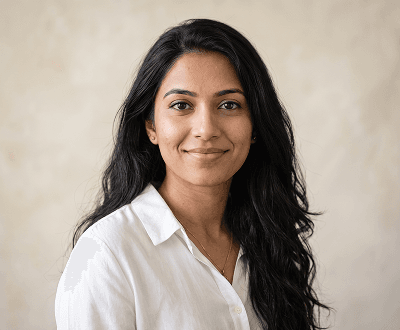
Happy expression
Upload a neutral portrait and select the happy expression — the AI face editor generates a realistic smile whilst keeping the rest of the image untouched.
Explore AI face editor features
Serious expression
Turn a casual or smiling portrait into a strong, focused look using the AI face editor — ideal for professional headshots and profile images.
See AI face editor use cases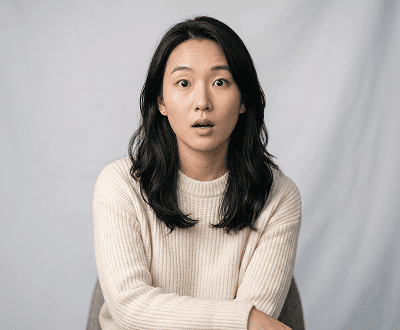
Surprised expression
Select the surprised expression and the AI face editor creates a natural wide-eyed, open-mouthed look — perfect for creative and campaign content.
Browse AI face editor guides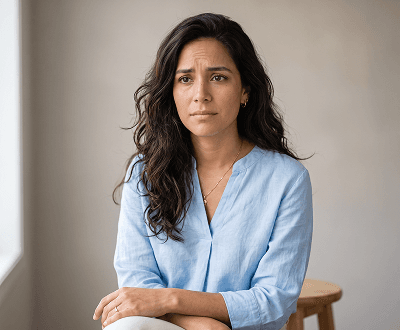
Sad expression
The AI face editor applies a natural sad or emotional expression to your uploaded photo — great for storytelling, film, and creative projects.
Try sad expression with AI face editor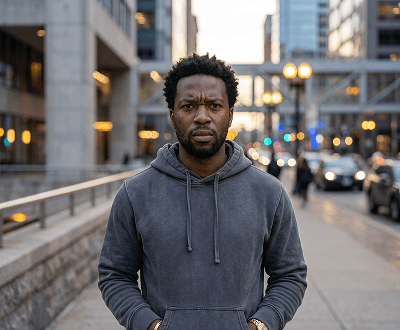
Angry expression
Upload any portrait and the AI face editor transforms the face into a convincing angry or intense expression — no manual editing required.
See angry expression AI face editor example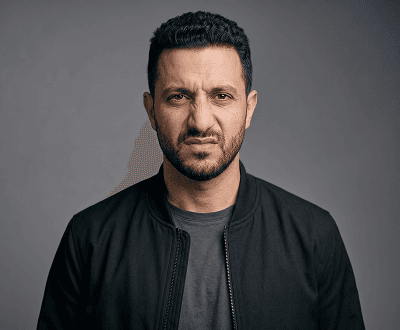
Disgusted expression
From subtle scepticism to full disgust, the AI face editor maps the expression naturally onto the uploaded face whilst keeping all other features intact.
Explore all AI face editor expressionsExpression editing workflows
This tool is built for fast facial expression edits, emotion previews, and portrait mood transformations.
01 / Happy
Upload any portrait and select the happy expression. AI generates a warm, realistic smile whilst keeping the face, background, and lighting completely natural.

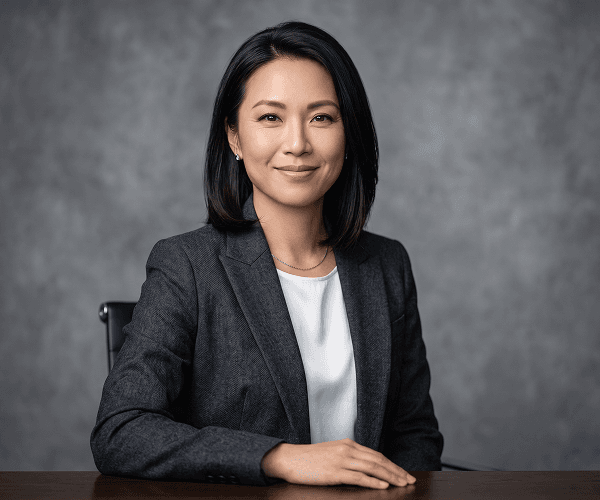
02 / Serious
Select the serious expression for professional headshots, LinkedIn profiles, or brand imagery that needs a confident, focused look.
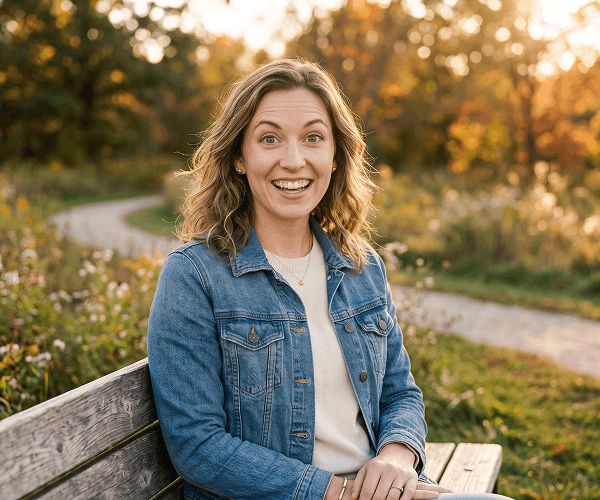
03 / Surprised
Use the surprised expression for creative content, reactions, social media posts, or campaign visuals that need energy and emotion.
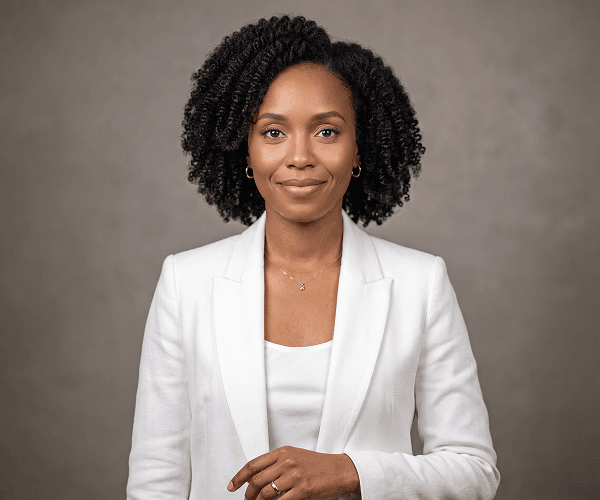
04 / Custom
Go beyond preset options — type a custom expression like 'thoughtful and calm' or 'excited with a big smile' and AI generates it on your portrait.
Popular Use Cases
Perfect for professionals, content creators, filmmakers, marketers, and anyone needing to preview or edit facial expressions without reshoots.
Start Editing Expressions FreeGenerate multiple expression options for LinkedIn, CVs, corporate profiles, and business headshots with the most flattering facial expression.
Learn more about AI Image EditorCreate expressive portrait variants for Instagram, TikTok, YouTube, and other platforms with different emotional tones—all without new photoshoots.
Explore all image editing featuresTest different emotional expressions—happy, serious, surprised, concerned—on campaign visuals, ads, and promotional materials for optimal audience impact.
See more face editor use casesPreview how talent and subjects look with different expressions before committing to expensive photoshoots or video production sessions.
Browse AI editing guidesGenerate realistic facial expressions for storyboarding, character development, emotional scene planning, and creative portfolio pieces.
Read the AI image upscaler guideStep-by-Step Process
Get realistic expression changes in minutes with no editing skills required. From portrait photo to emotion-edited image in just 4 steps.
Upload any JPG, PNG, WEBP, or GIF portrait up to 8MB, or select a built-in demo image to test expressions instantly.
Choose from preset expressions (happy, serious, surprised, sad, angry, neutral) or type a custom emotion prompt like 'thoughtful and calm'.
Advanced AI instantly transforms the facial expression whilst preserving identity, skin tone, lighting, and background completely intact.
Preview your expression-edited portrait and download the result. Generate multiple variants as needed for content testing and campaigns.
Helpful Resources
Tips, guides, and resources to master AI expression editing, create expressive portraits, and use emotion-edited photos in your creative workflows.
Compare expression editing, background removal, portrait retouching, upscaling, and 30+ other AI editing tools available in one platform.
Affordable credit options and pricing tiers for personal use, professional workflows, and high-volume expression editing projects.
Learn how to pair clean backgrounds with expression-edited portraits for polished, professional results.
Improve portrait quality before expression edits for sharper, higher-detail emotion transformation results.
Browse comprehensive tutorials for expression editing, portrait emotion workflows, and creative AI photo projects.
See real-world applications: professional headshots, social media content, campaigns, pre-production planning, and creative projects.
FAQ
Comprehensive answers to common questions about facial expression editing, emotion generation, supported files, and creative workflows.
AI Face Editor is a free online tool that lets you instantly change facial expressions on any portrait using AI. Upload a photo or use a demo image, select an emotion from presets (happy, serious, surprised, sad, angry, neutral) or write a custom expression prompt, and AI generates a photorealistic result.
Advanced AI analyses your portrait and applies realistic facial expression changes by naturally repositioning eyes, mouth, eyebrows, and facial muscles. The result looks completely authentic with no distortion or identity change.
No. You can test any expression using built-in demo portraits without uploading. Great for exploring options and understanding results before trying with your own photos.
Choose from preset emotions (happy, serious, surprised, sad, angry, neutral) or write a custom prompt describing any emotion like 'thoughtful and calm' or 'excited and energetic' for AI to generate.
No. AI Face Editor changes only the facial expression whilst completely preserving face identity, skin tone, lighting, and background. No distortion or unwanted changes.
AI Face Editor supports JPG, PNG, WEBP, and GIF uploads up to 8MB. Best results with clear, well-lit portraits with visible faces.
Yes. Generate as many expression variations as you need from a single portrait for A/B testing, social media content, campaigns, and creative projects.
Perfect for professional work. Used for LinkedIn headshots, corporate profiles, promotional materials, pre-production planning, and creative campaign development.
Each facial expression edit uses credits. New accounts receive 15 free signup credits. Affordable credit packs available on the pricing page for additional edits.
Yes, completely free to start. New accounts receive 15 signup credits allowing you to try several expression edits. No credit card required. Additional credits available at low cost.
Ready to Edit Facial Expressions?
Get started with 15 free credits. No credit card required. Transform any portrait's expression instantly, create content variants, and generate professional-quality emotion edits. Join 50,000+ professionals and creators using AI expression editing for headshots, content, and creative projects.