
Smooth forehead wrinkles and deep lines
Removes horizontal forehead lines, deep creases, and expression lines whilst maintaining natural brow shape, expression, and facial structure.
Upload any portrait photo or choose a demo image. Our AI automatically detects and removes wrinkles, fine lines, crow's feet, forehead creases, and smile lines—whilst keeping your face natural and realistic. Professional skin smoothing with zero editing skills required.
Professional AI Wrinkle Remover Tool
AI Wrinkle Remover is a free web-based tool that uses advanced artificial intelligence to automatically detect and remove wrinkles, fine lines, crow's feet, forehead creases, and skin creases from portrait photos. Simply upload a photo or select a demo image, click generate, and the AI smooths your skin whilst keeping your face natural and realistic. No editing skills required.
AI Wrinkle Remover is a free, web-based AI tool that automatically removes wrinkles, fine lines, crow's feet, smile lines, and skin creases from portrait and headshot photos with realistic, natural-looking results.
Removes horizontal forehead lines, deep creases, and expression lines whilst maintaining natural brow shape, expression, and facial structure.
Softens crow's feet, under-eye lines, and corner wrinkles whilst preserving eye shape, expression, natural tone, and realistic skin texture.
Reduces visible smile lines, mouth creases, and nasolabial folds naturally whilst keeping your expression and mouth shape completely intact.
Professional AI Wrinkle Remover Tool
Upload a portrait photo or select from our demo images to preview results instantly. The AI automatically detects and removes wrinkles, fine lines, forehead creases, crow's feet, smile lines, and nasolabial folds—whilst preserving natural skin texture, facial features, and realistic tone. Need more generations?Check AI Image Editor credit plans for affordable generation packages.
Skin smoothing features
Advanced one-click wrinkle removal that smooths forehead lines, crow's feet, smile lines, and fine lines across your entire face—without artificial skin or over-editing. Realistic results every time.
Removes horizontal forehead lines, deep creases, and expression lines whilst maintaining natural brow shape, expression, and facial structure.
Explore AI skin retouching use casesSoftens crow's feet, under-eye lines, and corner wrinkles whilst preserving eye shape, expression, natural tone, and realistic skin texture.
See all AI retouching featuresReduces visible smile lines, mouth creases, and nasolabial folds naturally whilst keeping your expression and mouth shape completely intact.
Read background remover guideThe AI smooths wrinkles without creating plastic or over-retouched skin—pores, texture, and natural tone remain visible and realistic.
Learn about AI upscaling for portraitsPreview results instantly without uploading your photo. Test on our demo portraits to see exactly how wrinkle removal works on your face type.
Explore more editing featuresNo editing skills required—just upload a photo or select a demo, click generate, and the AI handles all wrinkle removal automatically.
View AI editing guidesBefore and after results
Browse real-world examples of how AI Wrinkle Remover smooths forehead lines, crow's feet, smile lines, and fine lines whilst keeping skin natural and realistic.

Forehead wrinkles
Watch how the AI detects and smooths horizontal forehead wrinkles and deep expression lines whilst keeping your natural brow shape, skin tone, and facial structure exactly as they are.
Explore advanced features
Crow's feet
The AI automatically reduces crow's feet and fine lines around the eye corners whilst preserving your natural expression, eye shape, colour, and realistic skin texture.
Learn more AI editing techniques
Smile lines
See how smile lines and nasolabial folds are naturally softened around the mouth area whilst your expression and mouth shape stay completely natural and realistic.
See more AI use cases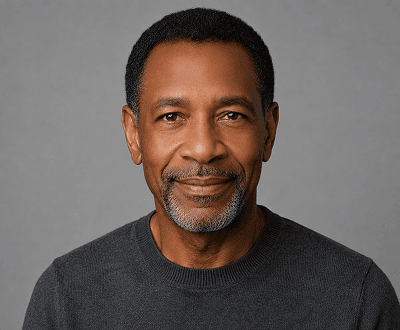
Full face smoothing
The AI processes your entire face—smoothing forehead lines, eye wrinkles, cheek creases, and mouth lines in a single generation whilst keeping everything realistic and natural.
View all smoothing features
Professional headshot
Prepare polished headshots for LinkedIn, CVs, business profiles, and professional portraits with smooth, natural-looking skin that looks professional but not artificial.
Read portrait enhancement guide
Natural results
AI Wrinkle Remover achieves that sweet spot—removing visible lines without creating an over-retouched, airbrushed, or plastic appearance. Your skin stays realistic and textured.
Browse AI editing guidesWrinkle removal workflows
Designed for anyone who wants smoother-looking portrait photos — no editing experience, no manual retouching, just upload and generate.

01 / Forehead
Upload a portrait or select a demo image and click generate. The AI identifies forehead wrinkles and horizontal creases and smooths them automatically whilst keeping the brow shape, skin tone, and facial proportions completely natural.
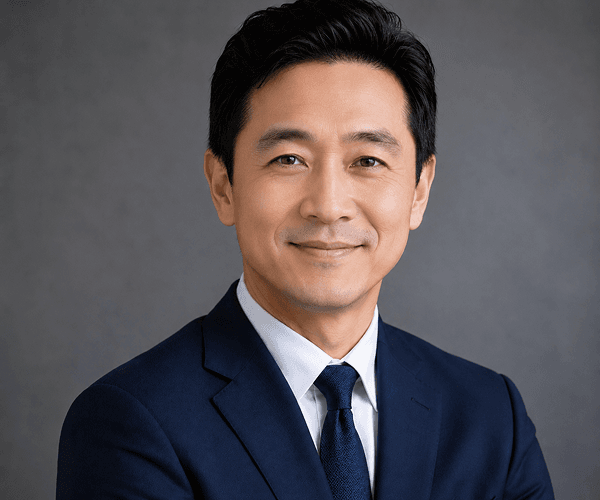
02 / Eyes
The AI targets the eye area specifically — softening crow's feet, under-eye lines, and fine corner wrinkles whilst keeping the eye shape, expression, and natural skin texture exactly as they are.

03 / Mouth
Smile lines and nasolabial folds around the mouth are softened by the AI whilst keeping the mouth, expression, and lower face looking completely natural and proportionate.

04 / Full face
Process the entire face in one click. AI Wrinkle Remover detects and smooths all visible wrinkles across the forehead, eyes, cheeks, and mouth area whilst keeping the skin realistic, textured, and natural — no over-retouched or plastic finish.
Wrinkle removal use cases
Perfect for LinkedIn headshots, social media profile photos, professional portraits, family photos, and anyone who wants naturally smoother skin in their portrait photos.
Remove wrinkles from your photo nowCreate polished, professional headshots for LinkedIn, CVs, company directories, and corporate profiles without hiring a professional retoucher.
Learn more about AI Image EditorRefresh profile photos across Instagram, Facebook, TikTok, Twitter, and other platforms with naturally smooth, wrinkle-free skin in seconds.
Explore all AI editing featuresSmooth fine lines and wrinkles in family portraits, reunion photos, and personal pictures before printing, framing, or sharing with loved ones.
See more portrait editing use casesPrepare professional portrait photos for ads, brand campaigns, website headers, email marketing, and content marketing with polished, wrinkle-free skin.
Explore marketing featuresStep-by-step guide
It's simple: upload a portrait photo or choose a demo image, click generate, and our AI automatically removes all wrinkles and fine lines. No settings, sliders, or editing skills required.
Select your portrait photo (JPG, PNG, WebP, or GIF up to 8MB) or test with one of our demo images to preview the wrinkle removal result before using your own photo.
Hit the generate button and our AI instantly detects and removes wrinkles, fine lines, crow's feet, forehead creases, and skin creases across your entire face in seconds.
Review your professionally smoothed, wrinkle-free portrait and download the high-quality image ready for LinkedIn, social media, headshots, or any use.
More AI editing resources
Expand your portrait editing skills with guides on retouching, skin smoothing, upscaling, background removal, and more.
Explore complete skin retouching, background removal, object editing, upscaling, portrait enhancement, and makeup features.
Compare credit packages, per-generation costs, and find the best plan for your portrait editing and retouching volume.
Combine wrinkle removal with professional background replacement for perfect LinkedIn headshots and business portraits.
Learn when to upscale portrait photos, how to improve resolution, and when to combine upscaling with retouching.
Compare our all-in-one AI editor with Photoshop, specialised retouching tools, and other portrait editing alternatives.
Browse tutorials, best practices, and guides for portrait retouching, wrinkle removal, upscaling, and creative editing.
Frequently asked questions
Get answers to the most popular questions about AI wrinkle removal, skin smoothing, portrait editing, and photo retouching.
AI Wrinkle Remover is a free web-based tool that uses advanced artificial intelligence to automatically detect and remove wrinkles, fine lines, crow's feet, forehead creases, and skin creases from portrait photos. Simply upload a photo or select a demo image, click generate, and the AI smooths your skin whilst keeping your face natural and realistic. No editing skills required.
Yes! New accounts include 15 free signup credits, and each wrinkle removal generation costs 10 credits—giving you at least one free generation. When you need more edits, affordable credit packs are available at our pricing page. No credit card required to get started.
Our AI can smooth and reduce forehead wrinkles, horizontal expression lines, crow's feet around the eyes, under-eye fine lines, smile lines, nasolabial folds (lines around the mouth), cheek creases, and any fine lines across the full face. It handles all common ageing signs whilst preserving natural skin texture.
No. Our AI is specifically trained to preserve natural skin texture, pores, and tone whilst removing wrinkles. The result looks smoothed but realistic—never plastic, airbrushed, or over-edited. You'll look like yourself, just with smoother skin.
Absolutely! Our demo images let you see exactly how the AI works on different face types, skin tones, and age groups before uploading your own portrait. This is a great way to preview results and understand what to expect.
No settings required! Just upload a photo or select a demo, click the generate button, and the AI handles everything automatically. There are no sliders, strength adjustments, or manual selections—complete one-click simplicity.
A clear, well-lit portrait with the face prominently visible, in focus, and properly exposed works best. Avoid very blurry, extremely low-resolution, heavily pixelated, or poorly lit images for optimal wrinkle removal accuracy. JPG, PNG, WebP, and GIF formats are all supported (up to 8MB).
AI Wrinkle Remover accepts JPG, PNG, WebP, and GIF files up to 8MB. Most portrait photos are well under this size, so you shouldn't have issues uploading your photos.
Yes! AI Wrinkle Remover is perfect for preparing professional headshots for LinkedIn, CVs, company pages, corporate portraits, and business photography. The results are polished and professional without looking over-edited.
Yes. All uploads are processed securely and screened for inappropriate content according to our Acceptable Use Policy. Generated images can be downloaded immediately. See our privacy policy for complete details on data handling.
Start removing wrinkles today
Upload your portrait photo or select a demo image, click generate, and get professional wrinkle removal results instantly. Free to try with 15 signup credits. No credit card required.